Brocade BR1860 模式切换指南
最近又买了两张BR1860 正好记录一下怎么给这卡切换模式
这卡很神奇也很特殊 它支持HBA(FC)/CNA(FCoE)/NIC(Eth) 三种模式 而且支持两个口开成不同的模式
比如 1口开16G FC 2口开10G Eth 一张卡搞定FC网和以太网
可以为尴尬的家用主板节省一条PCIe插槽
但这卡也有个小缺点 认亲
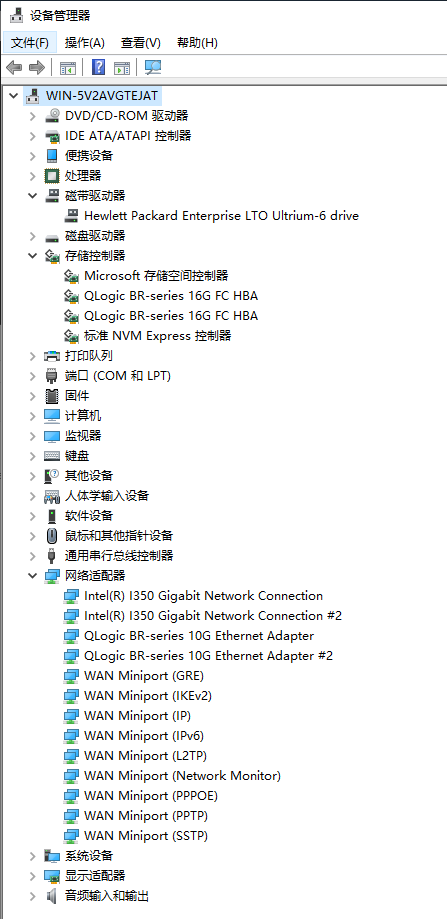
必须插博科(Brocade)原厂的模块才能正常使用 插其他品牌的模块 直接不工作
首先需要安装驱动 由于该驱动目前不太好找 这里提供一个
https://blog.pusa.uk/br1860/brocade_driver_win2012_x64_v3-2-6-0.exe
安装时可以选择安装位置 如果不选择 默认装在 C:\Program Files\Brocade
我们需要使用驱动包中的bcu工具进行操作(默认位置 C:\Program Files\Brocade\Adapter\Driver\util
使用 bcu port –list 命令 查看一下这张卡当前的模式
C:\Program Files\Brocade\Adapter\Driver\util>bcu port --list
---------------------------------------------------------------------------
Port#  FN  Type  PWWN/MAC                 FC Addr/  Media  State       Spd
                                          Eth dev
---------------------------------------------------------------------------
 1/0   -   dcb   8c:7c:ff:**:**:**        --        --     Linkdown    ---
       0   fcoe  10:00:8c:7c:ff:**:**:**  --               Linkdown
       2   eth   8c:7c:ff:**:**:**        以太网 *         Linkdown
       4   eth   8c:7c:ff:**:**:**        以太网 *         Linkdown
 1/1   -   dcb   8c:7c:ff:**:**:**        --        --     Linkdown    ---
       1   fcoe  10:00:8c:7c:ff:**:**:**  --               Linkdown
       3   eth   8c:7c:ff:**:**:**        以太网 *         Linkdown
       5   eth   8c:7c:ff:**:**:**        以太网 *         Linkdown
 2/0   -   fc    10:00:8c:7c:ff:**:**:**  --        --     Linkdown    ---
       0   fc    10:00:8c:7c:ff:**:**:**  --        --     Linkdown    ---
 2/1   -   dcb   8c:7c:ff:**:**:**        --        sw     Linkup      10G
       1   eth   8c:7c:ff:**:**:**        以太网 *         Linkup
---------------------------------------------------------------------------

* indicates the "device name" is truncated. Refer to 'port --query' output.
我这次买到的两张卡 默认都是FCoE模式(卡1还没改模式 卡2已经改好了
现在我们要把它改成 1口HBA 2口NIC
使用 bcu port –mode <port_id> {HBA|CNA|NIC} 命令修改模式
C:\Program Files\Brocade\Adapter\Driver\util>bcu port --mode 1/0 HBA
Warning: This command will not reset the settings configured on the port.

Port mode is configured successfully.
A host reboot is needed for the changes to be effective. You may also have to change the SFP to match the new mode.

Warning: Please make sure that the relevant drivers are installed for the device to be functional.


C:\Program Files\Brocade\Adapter\Driver\util>bcu port --mode 1/1 NIC
Warning: This command will not reset the settings configured on the port.

Port mode is configured successfully.
A host reboot is needed for the changes to be effective. You may also have to change the SFP to match the new mode.

Warning: Please make sure that the relevant drivers are installed for the device to be functional.
这样就改好了 需要重启电脑才能生效
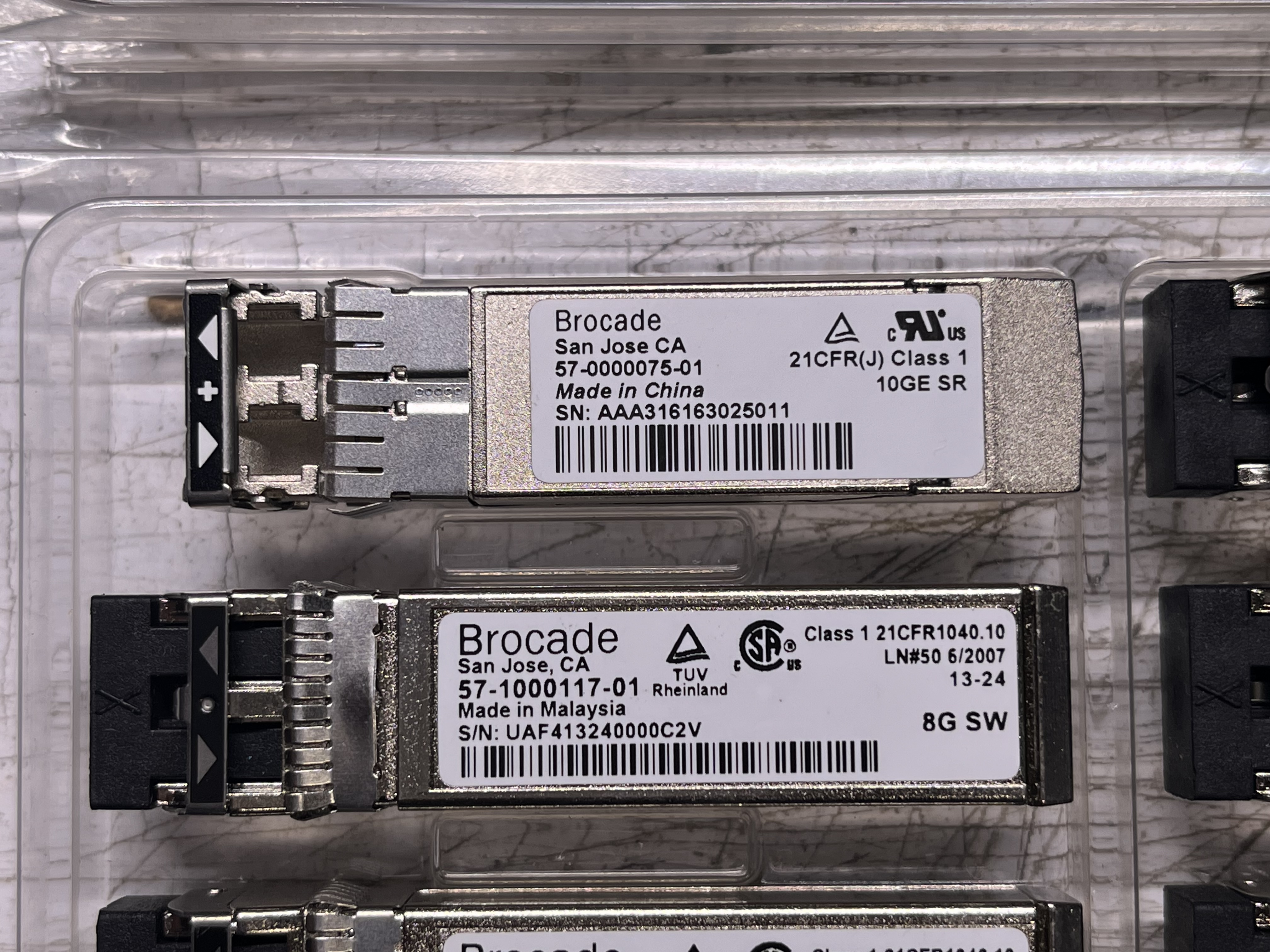
重启后插好对应的模块连接到对应的设备 验收一下改的成果
这里我插了一个8G的FC模块连接到磁带机 一个10G的Eth模块连接到网络交换机
C:\Program Files\Brocade\Adapter\Driver\util>bcu port --list
---------------------------------------------------------------------------
Port#  FN  Type  PWWN/MAC                 FC Addr/  Media  State       Spd
                                          Eth dev
---------------------------------------------------------------------------
 1/0   -   fc    10:00:8c:7c:ff:**:**:**  000001    sw     Linkup      8G
       0   fc    10:00:8c:7c:ff:**:**:**  000001    sw     Linkup      8G
 1/1   -   dcb   8c:7c:ff:**:**:**        --        sw     Linkup      10G
       1   eth   8c:7c:ff:**:**:**        以太网 *         Linkup
 2/0   -   fc    10:00:8c:7c:ff:**:**:**  --        --     Linkdown    ---
       0   fc    10:00:8c:7c:ff:**:**:**  --        --     Linkdown    ---
 2/1   -   dcb   8c:7c:ff:**:**:**        --        --     Linkdown    ---
       1   eth   8c:7c:ff:**:**:**        以太网 *         Linkdown
---------------------------------------------------------------------------

* indicates the "device name" is truncated. Refer to 'port --query' output.

C:\Program Files\Brocade\Adapter\Driver\util>bcu port --query 1/0
function id:                1/0/0
port type:                  16G FC
port mode:                  FC
port instance:              0
port name:
Media:                      sw
Beacon status:              Off
PWWN:                       10:00:8c:7c:ff:**:**:**
NWWN:                       20:00:8c:7c:ff:**:**:**
state:                      Linkup
Speed:
        current:            8G
        configured:         Auto
Topology:
        current:            P2P
        configured:         P2P
SNIA port type:             P2P
supported classes:          Class-3
symbolic name:              QLogic-1860-2p | 3.2.26.1 | WIN-5V2AVGTEJAT |  |
maximum frame size:         2112
receive bb credits:         80
transmit bb credits:        8
BB CreditRecovery:          Disabled
QOS:                        Disabled
TRL:                        Disabled
TRL default speed:          1G
pbind status:               Enabled

C:\Program Files\Brocade\Adapter\Driver\util>bcu port --query 1/1
function id:                1/1/1
port type:                  10G Eth
port mode:                  NIC
port instance:              1
port name:
Media:                      sw
Speed:                      10G
CNA/DCB state:              Linkup
Beacon status:              Off
Eth:
        MAC:                8c:7c:ff:**:**:**
        Factory MAC:        8c:7c:ff:**:**:**
        state:              Linkup
        OS Eth Device:      以太网 9